CupThread React Native & Expo SDK - v0.1.0
CupThread React Native & Expo SDK
Official TypeScript SDK for React Native and Expo apps (iOS, Android, and Web).
Part of the CupThread.com platform.
🤖 Recommended: Install via AI Agent (Agentic Coding)
Instead of manually editing package files and writing boilerplate by hand, install the official CupThread React Native AI Skill into your workspace with npx skills and let your AI assistant (Claude Code, Cursor, Copilot, Windsurf, Codex, Antigravity) integrate and customize it for you:
npx skills add CupThread/CupThreadAgenticCoding --skill cupthread-react-native-sdk
Once installed, simply copy and paste this prompt to your AI coding agent:
Integrate the CupThread SDK (feedback, roadmap, and feature requests screens) into this React Native app. Scaffold a dedicated configuration helper with a placeholder for the App Key, and at the end, remind me with step-by-step instructions on how to set my App Key safely (e.g. via .env or EXPO_PUBLIC_CUPTHREAD_APP_KEY).
CupThread Ecosystem
- 🌐 CupThread.com — Feedback SaaS platform, developer console, and API.
- 🍏 CupThread/CupThreadSwiftSDK — Apple platform SDK (SwiftUI / SPM / XCFramework).
- 🤖 CupThread/CupThreadAndroidSDK — Android SDK (Jetpack Compose / Maven).
- ⚛️ CupThread/CupThreadReactNativeSDK — React Native & Expo SDK (TypeScript).
- 💙 CupThread/CupThreadFlutterSDK — Flutter SDK (Dart).
- 🧠 CupThread/CupThreadAgenticCoding — AI-friendly CLI & Skills for pair programming.
Requirements
- React Native:
>= 0.70.0 - React:
>= 18.0.0 - Expo: Compatible with Expo SDK 47+ (bare or managed workflow, zero native binary dependencies)
Installation
Option A: Install from GitHub Release / Tag (Recommended for latest updates)
You can install the SDK directly from the official GitHub repository using a tagged release. It is strongly recommended to pin a specific tag or version commit (e.g. #v0.1.0) for repeatable and reproducible production builds:
# npm
npm install github:CupThread/CupThreadReactNativeSDK#v0.1.0
# yarn
yarn add github:CupThread/CupThreadReactNativeSDK#v0.1.0
# pnpm
pnpm add github:CupThread/CupThreadReactNativeSDK#v0.1.0
# Expo
npx expo install github:CupThread/CupThreadReactNativeSDK#v0.1.0
Note: For package.json dependency specification, use "@cupthread/react-native": "github:CupThread/CupThreadReactNativeSDK#v0.1.0".
Option B: Install from npm Registry
# npm
npm install @cupthread/react-native
# yarn
yarn add @cupthread/react-native
# pnpm
pnpm add @cupthread/react-native
# Expo
npx expo install @cupthread/react-native
Quick Start
import React from 'react';
import {
FeedbackClient,
CupThreadProvider,
RoadmapBoardScreen,
FeatureRequestsScreen,
WhatsNewScreen,
ChangelogOverlay,
} from '@cupthread/react-native';
const client = new FeedbackClient({
baseUrl: 'https://api.cupthread.com',
appKey: 'app_xxx', // from your CupThread Developer Console
});
export default function App() {
return (
<CupThreadProvider client={client} locale="zh-Hans">
<RoadmapBoardScreen />
</CupThreadProvider>
);
}
Ready-Made React Native Screens & Components
Wrap your app or screen in <CupThreadProvider client={client}> to automatically inherit developer console appearance settings, color palette, anonymous user token, and localized strings.
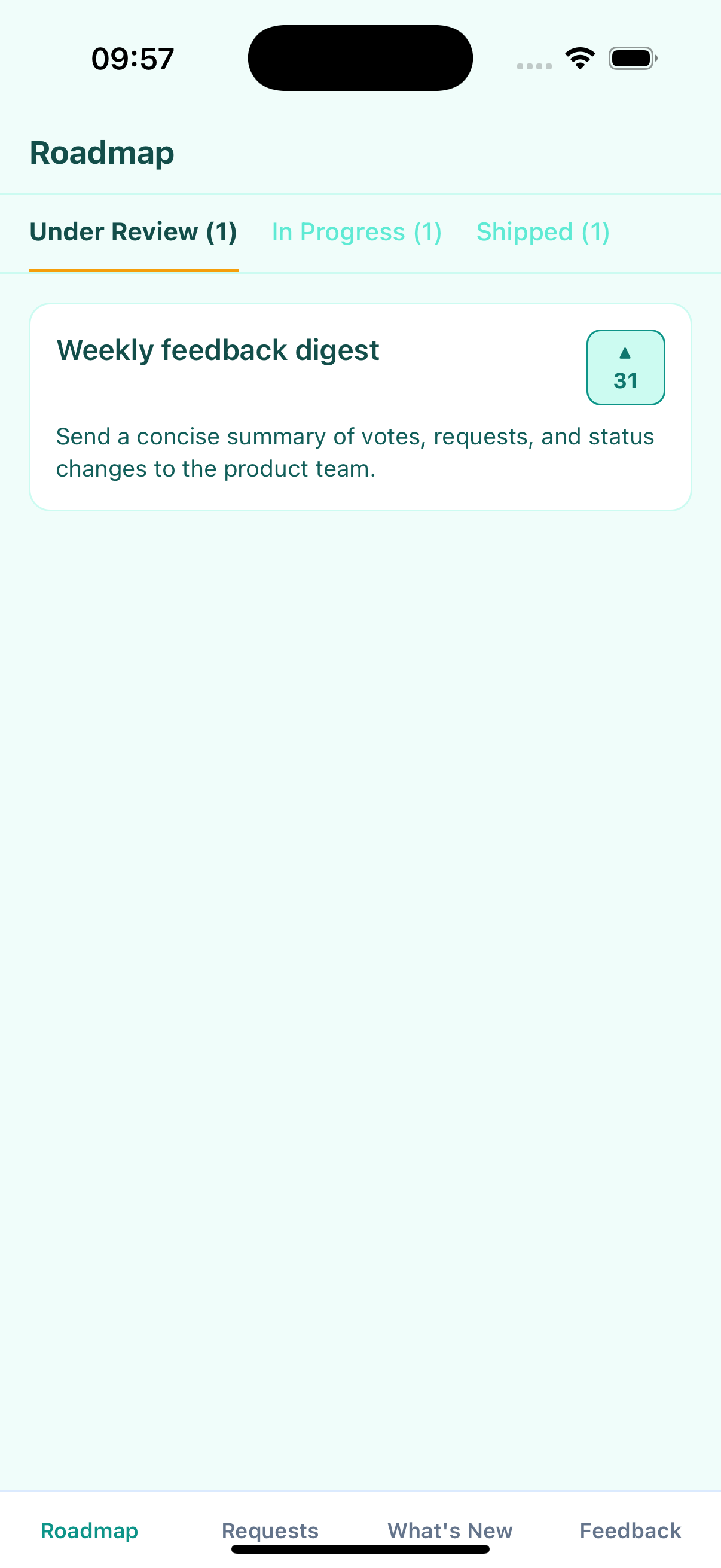
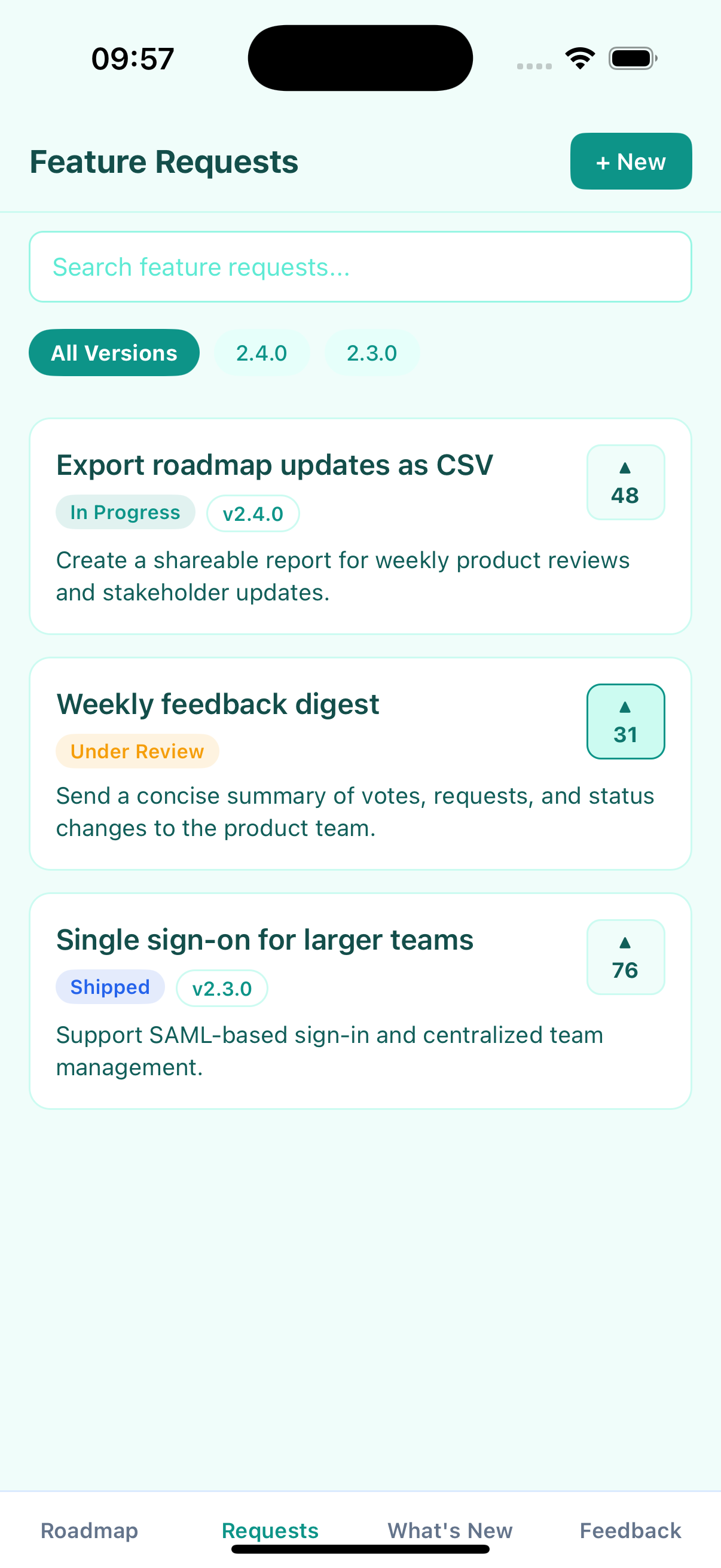
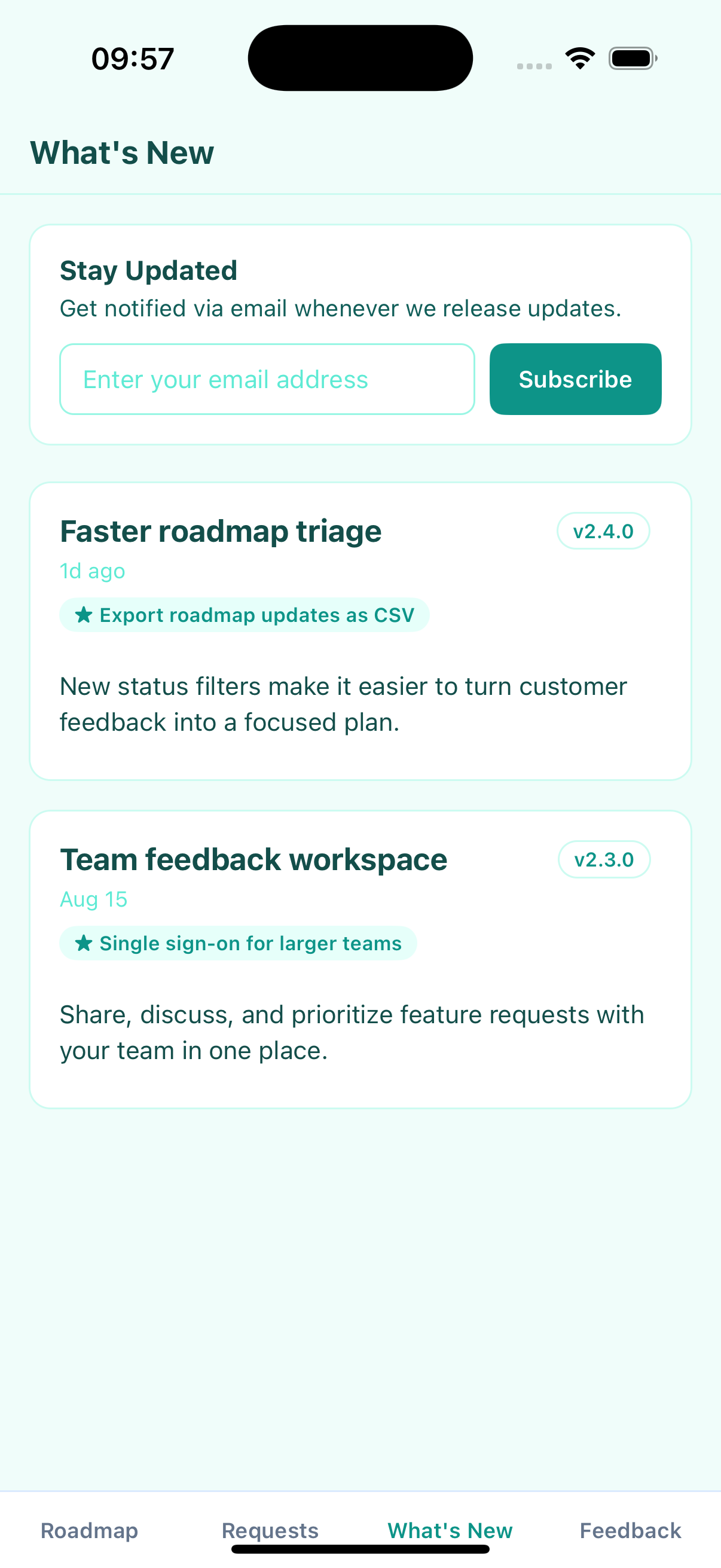
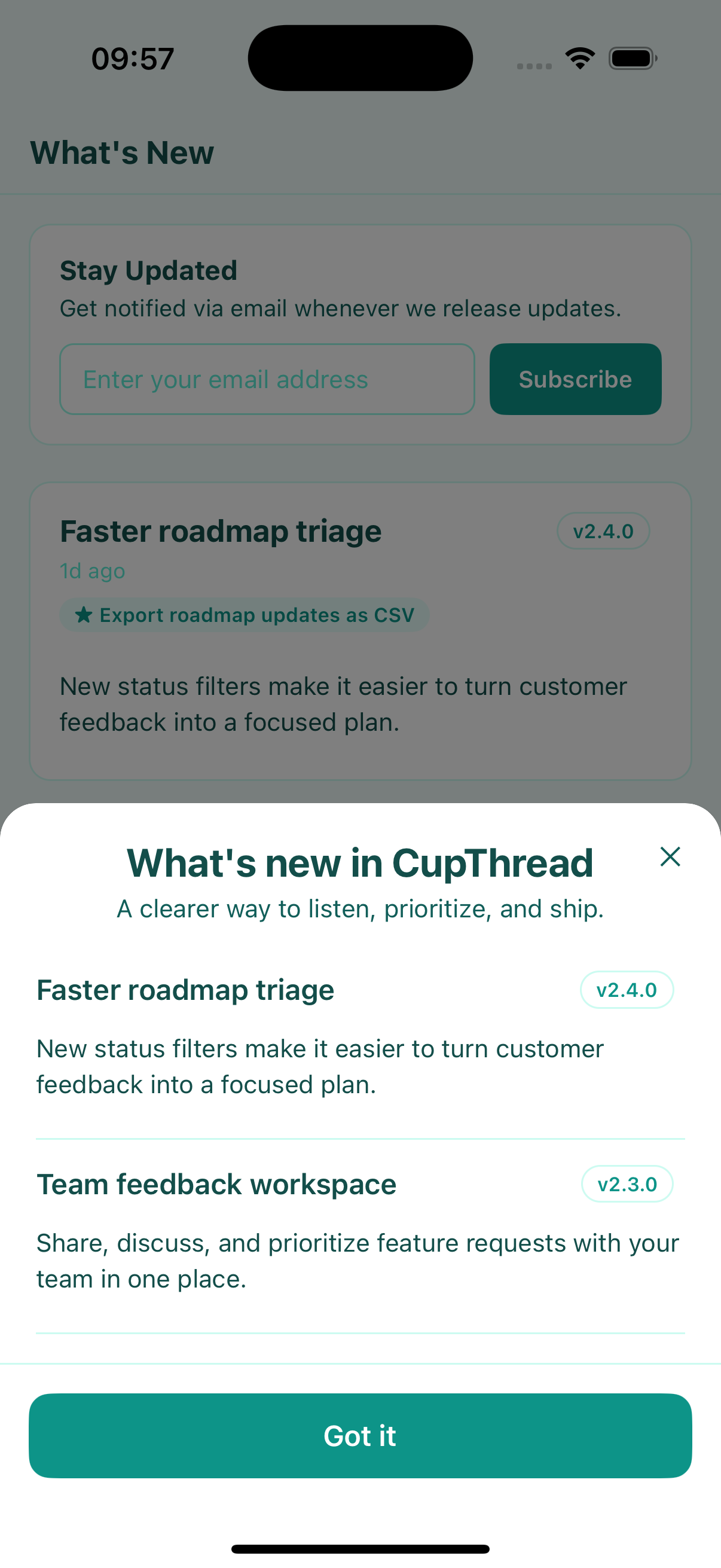
<RoadmapBoardScreen />: Kanban roadmap board grouped by public columns with vote counts and stage badges. Requests whose column is hidden, deleted, or missing from the visible set are collected under an automatic Other tab instead of silently disappearing from the board.<FeatureRequestsScreen />: Searchable feature requests list with optimistic upvoting, version filter chips, and propose feature modal.<FeatureRequestComposeSheet visible={...} onClose={...} />: Dedicated modal sheet for proposing new feature requests (POST /api/v1/feature-requests).<WhatsNewScreen />: Interactive release notes / changelog with Markdown formatting and email subscription.<ChangelogOverlay visible={...} onClose={...} />: In-app modal announcement sheet for the latest release notes with automatic "seen status" persistence.<FeedbackComposer visible={...} onClose={...} onPickAttachment={...} />: Structured feedback form with attachment upload management.<UserProfileScreen userId={...} />: Public user/developer profile screen.
Visual Showcase
| Roadmap Board | Feature Requests | Submit Request |
|---|---|---|
 |
 |
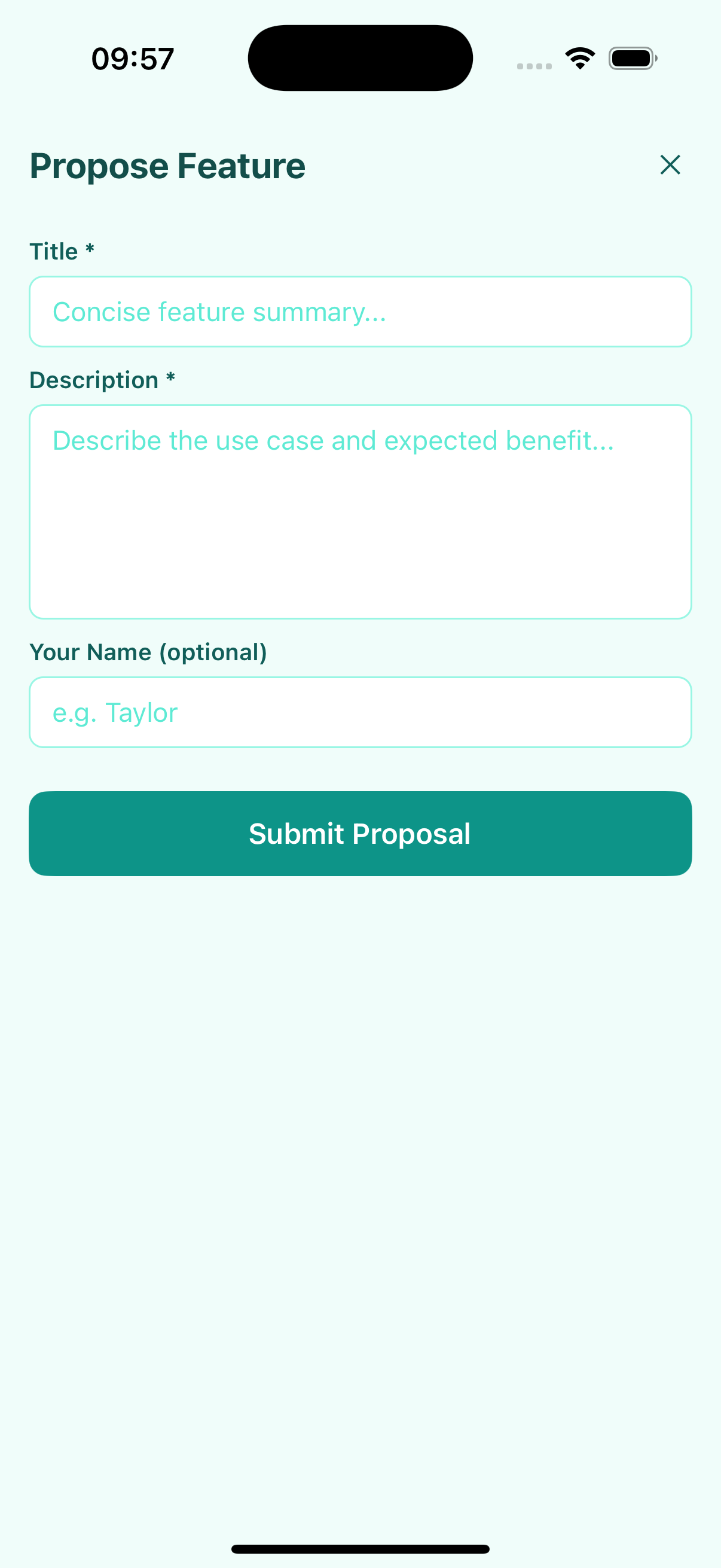 |
| Kanban columns, stage chips, and votes | Searchable requests with version filters | Focused request composition sheet |
| What's New | Changelog Overlay | Feedback Composer |
|---|---|---|
 |
 |
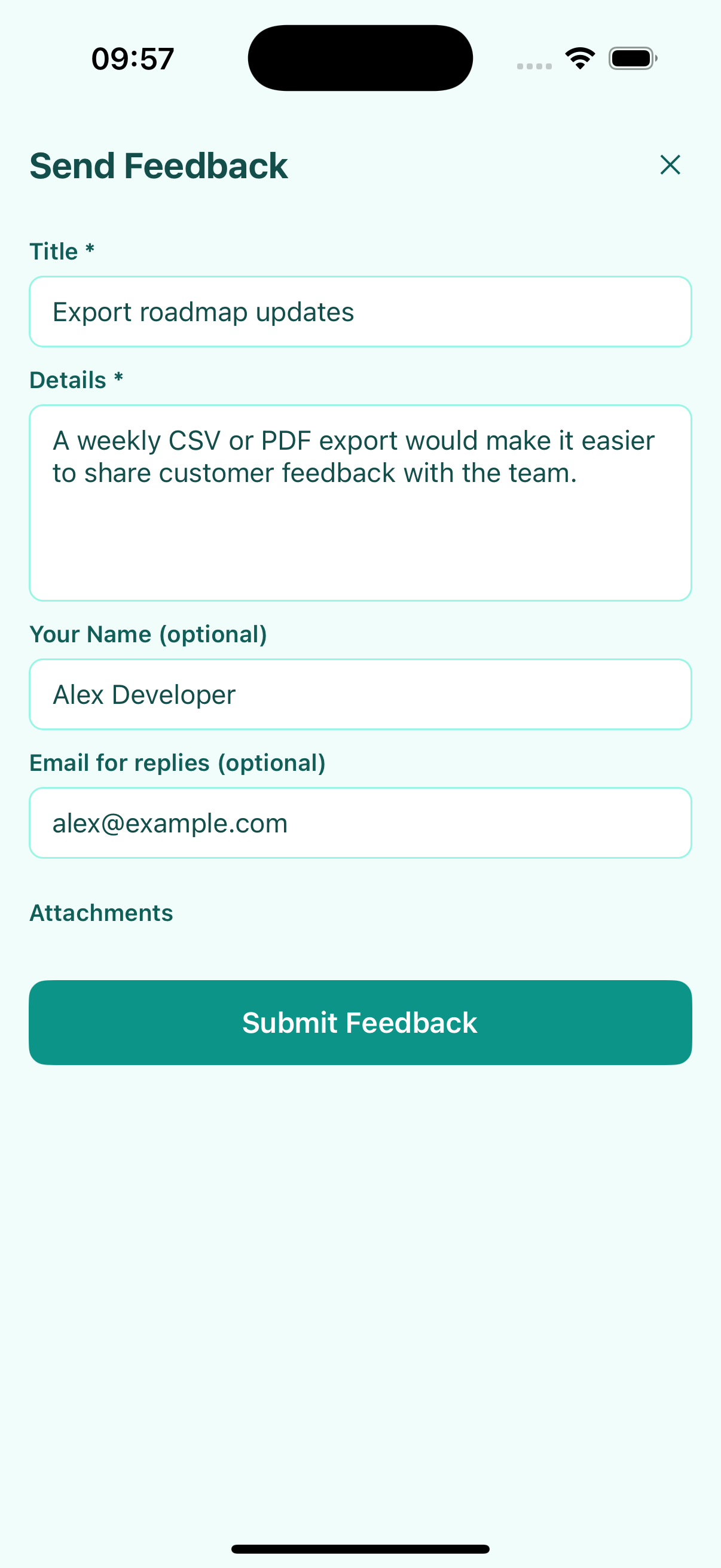 |
| Markdown release notes and subscriptions | In-app release announcement sheet | Structured, prefilled feedback form |
The images above are produced by a deterministic Expo showcase with fixture data. The same image paths are copied into the generated TypeDoc site, so GitHub Pages and this README always show the identical SDK surfaces.
Key Features & Customization
1. Internationalization (i18n)
The SDK includes built-in localization for English (en), French (fr), Spanish (es), German (de), Italian (it), Portuguese (pt / pt-BR), Japanese (ja / ja-JP), Traditional Chinese (zh-Hant / zh-TW), Korean (ko / ko-KR), Polish (pl), Norwegian (no / nb-NO), Turkish (tr), Vietnamese (vi / vi-VN), and Simplified Chinese (zh-Hans / zh-CN).
By default the provider follows the device language (locale="auto" is the default): the locale is detected through expo-localization or react-native-localize when your app already ships either, then React Native core (iOS SettingsManager, Android I18nManager, or navigator.language on web), and falls back to English when nothing is detectable. Neither detection package is required — both are declared as optional peer dependencies. Regional variants are matched automatically (pt-BR → pt, zh-Hans-CN → zh-Hans, nb-NO → no), and the resolved locale is exposed as useCupThreadContext().locale.
To force a specific language (e.g. for an in-app language picker), pass an explicit locale — it always wins over the detected device language. You can also provide custom string overrides directly via <CupThreadProvider>:
<CupThreadProvider
client={client}
locale="zh-Hans"
strings={{
feedbackComposer: {
title: '产品反馈与建议',
},
featureRequests: {
newButton: '+ 提点新想法',
},
}}
>
<FeatureRequestsScreen />
</CupThreadProvider>
2. Changelog Seen Status Persistence
ChangelogOverlay and client.prepareChangelogOverlay() automatically remember which release notes the user has already seen, avoiding annoying duplicate popups:
Storage Requirement: To persist seen status across app restarts, configure a storage adapter (such as
@react-native-async-storage/async-storage) viaUserTokenStore.configure(AsyncStorage)at application startup, or pass an adapter-backedtokenStoreprop (<ChangelogOverlay tokenStore={customStore} />). Without a configured adapter, seen tracking degrades to in-memory only (store.isPersistent === false) and the sheet will re-appear on every app launch.
import React, { useEffect, useState } from 'react';
import AsyncStorage from '@react-native-async-storage/async-storage';
import {
CupThreadProvider,
ChangelogOverlay,
FeedbackClient,
UserTokenStore,
} from '@cupthread/react-native';
// Enable persistence for changelog seen status and anonymous user tokens
UserTokenStore.configure(AsyncStorage);
const client = new FeedbackClient({
baseUrl: 'https://api.cupthread.com',
appKey: 'app_xxx',
});
export function AppHomeScreen() {
const [showOverlay, setShowOverlay] = useState(false);
useEffect(() => {
// Only display if the user hasn't seen this latest version release yet
client.prepareChangelogOverlay({ onlyIfUnseen: true }).then((payload) => {
if (payload) {
setShowOverlay(true);
}
});
}, []);
return (
<CupThreadProvider client={client}>
<ChangelogOverlay
visible={showOverlay}
onlyIfUnseen={true}
autoMarkSeen={true} // Marks this version as seen when user closes the modal
onClose={() => setShowOverlay(false)}
/>
</CupThreadProvider>
);
}
3. Attachment Uploads in Feedback Composer
Connect your preferred file picker (e.g. expo-image-picker or react-native-image-picker) using the onPickAttachment prop. The composer handles file previews, human-readable size badges, removal, and automatic uploading via CupThread Cloudflare R2 / image upload endpoints:
import * as ImagePicker from 'expo-image-picker';
import { FeedbackComposer } from '@cupthread/react-native';
<FeedbackComposer
visible={isOpen}
onClose={() => setIsOpen(false)}
onPickAttachment={async () => {
const result = await ImagePicker.launchImageLibraryAsync({
mediaTypes: ImagePicker.MediaTypeOptions.Images,
quality: 0.8,
});
if (!result.canceled && result.assets[0]) {
const asset = result.assets[0];
return {
file: { uri: asset.uri },
filename: asset.fileName || 'screenshot.png',
mimeType: asset.mimeType || 'image/png',
preferredKind: 'image',
};
}
return null;
}}
/>;
The composer accepts three picker return shapes: pre-uploaded FeedbackAttachment descriptors ({ kind, key, url, ... }, attached as-is), UploadAttachmentOptions payloads ({ file, filename, mimeType, preferredKind? }, uploaded automatically), and the legacy { fileUri, filename?, mimeType?, kind? } alias, which is normalized into an upload automatically. Any item matching none of these shapes surfaces a visible, localized error instead of being silently dropped.
Platform Allowlist Validation
When <CupThreadProvider> loads your application configuration (PublicAppConfig), FeedbackComposer automatically validates the outgoing feedback platform against allowedPlatforms via resolveAllowedPlatform(). If the candidate platform (from initialDraft.platform, client.config.defaultPlatform, or the runtime OS) is excluded from the app's configured allowlist, it falls back to the first allowed platform and emits a diagnostic warning in development mode (__DEV__).
4. Persistent Anonymous User Token
The SDK generates a persistent client token (cupthread_user_token_v1) to attribute upvotes and feedback across app restarts, as well as persisting changelog seen status (cupthread_seen_changelogs_v1). Compatible with synchronous storage or asynchronous adapters like @react-native-async-storage/async-storage:
import AsyncStorage from '@react-native-async-storage/async-storage';
import { UserTokenStore } from '@cupthread/react-native';
UserTokenStore.configure(AsyncStorage);
console.log('Storage is persistent:', UserTokenStore.shared.isPersistent); // true
Storage Security & Encrypted Adapters
The token is a bearer credential identifying the user to the CupThread API for all actions (votes, comments, feedback, and user attributes). While plaintext AsyncStorage is fine for local-only development or anonymous-only usage, production apps—especially when using setToken() with real user IDs—should persist it with an encrypted adapter such as expo-secure-store (Expo) or react-native-keychain / encrypted MMKV (bare React Native).
SecureStore's (get|set|delete)ItemAsync map ~1:1 onto TokenStorageAdapter. The asynchronous adapter path is fully supported (getToken() and isTokenReady handle pending reads seamlessly):
import * as SecureStore from 'expo-secure-store';
import { UserTokenStore } from '@cupthread/react-native';
// SecureStore's (get|set|delete)ItemAsync map ~1:1 onto TokenStorageAdapter.
// Values are limited to ~2 KB — fine for UUIDs and user IDs.
UserTokenStore.configure({
getItem: (key) => SecureStore.getItemAsync(key),
setItem: (key, value) => SecureStore.setItemAsync(key, value),
removeItem: (key) => SecureStore.deleteItemAsync(key),
});
Login / Logout Identity Switching
To attribute SDK activity to your own signed-in users, call setToken() after login and resetToken() on logout. <CupThreadProvider> (mounted without an explicit userToken prop) subscribes to these switches automatically — every mounted SDK screen re-resolves its token and subsequent votes, comments, and feedback are attributed to the new identity:
// After your auth flow signs the user in:
await UserTokenStore.shared.setToken(user.id);
// On logout:
await UserTokenStore.shared.resetToken();
Calling setToken(user.id) persists the identifier through the configured adapter, so the adapter choice is a credential-storage decision. Use an encrypted adapter (such as expo-secure-store or Keychain) in production to ensure user identifiers are never stored in plaintext.
Notes:
- Call these after
UserTokenStore.configure(...); there is no need to remount the provider. - An explicit
userTokenprop on<CupThreadProvider>always wins; while it is set, store switches are ignored by SDK screens. Omit the prop if you plan to drive the identity throughsetToken()/resetToken(). - Outside a provider, always
await getToken()before token-dependent calls (or gate onuseCupThreadTokenReadiness()inside one) so early requests are not attributed to a throwaway identity.
5. Remote Configuration & Error Recovery
<CupThreadProvider> fetches remote application settings and theme branding at mount. If the initial fetch fails (e.g. offline launch or flaky connection), the provider automatically retries once after a short 2-second delay. If the retry also fails, the error is surfaced via useCupThreadContext().configError while falling back safely to the 'system' theme:
import { useCupThreadContext } from '@cupthread/react-native';
function AppHeader() {
const { appConfig, isLoadingConfig, configError, refreshConfig } = useCupThreadContext();
if (configError) {
return (
<View style={styles.errorBanner}>
<Text>Failed to load configuration: {configError.message}</Text>
<TouchableOpacity onPress={() => refreshConfig()}>
<Text>Retry</Text>
</TouchableOpacity>
</View>
);
}
return <Text>{isLoadingConfig ? 'Loading...' : appConfig?.name}</Text>;
}
- Distinguishable states: Hosts can inspect
configError,isLoadingConfig, andappConfigto distinguish loading, error, and loaded states instead of silently falling back without explanation. - Manual escape hatch: Call
refreshConfig()at any time to re-fetch configuration from the server; on success,configErroris cleared and remote branding is applied. - Development visibility: In development (
__DEV__), persistent config fetch failures log a warning to the console ([CupThread] Failed to load app config:).
API Client Surface
Client Configuration (FeedbackClientConfig)
| Option | Type | Default | Description |
|---|---|---|---|
baseUrl |
string |
(required) | Root API URL of the CupThread backend instance |
appKey |
string |
(required) | Unique application key from Developer Console |
defaultPlatform |
FeedbackPlatform |
auto-detected | Default platform reported on feedback submissions (ios, android, etc.) |
timeoutMs |
number |
15000 |
Optional timeout in milliseconds for API (JSON) requests; throws RequestTimeoutException on timeout |
uploadTimeoutMs |
number |
60000 |
Optional completion budget in milliseconds for attachment uploads (uploadAttachment); independent of timeoutMs, overridden per call by uploadAttachment({ timeoutMs }) |
turnstileTokenProvider |
() => string | undefined | Promise<string | undefined> |
undefined |
Optional async provider resolving a Cloudflare Turnstile token before intake submissions (submit, submitFeatureRequest); see Human Verification (Turnstile) |
tokenTransport |
'query' | 'header' | 'both' |
'header' |
Strategy for user token transport on fetchFeatureRequests ('header' prevents query string leakage per CWE-598) |
All public methods accept an optional AbortSignal or RequestOptions ({ signal?: AbortSignal, timeoutMs?: number }) to support cancellation on component unmount and per-request timeout overrides. When a request is cancelled by caller signal, an AbortError is thrown so UI components can ignore it cleanly.
Methods
| Method | Endpoint | Description |
|---|---|---|
submit(draft, userToken?, options?) |
POST /api/v1/feedback |
Submit feedback draft with metadata and attachments |
uploadAttachment(options) |
POST /api/v1/uploads/{images,r2} |
Upload screenshot or log attachment (supports signal, timeoutMs) |
fetchAppConfig(options?) |
GET /api/v1/public/config/{appKey} |
Fetch app branding, appearance, and public settings (returns 404 for private or unknown apps) |
fetchColumns(options?) |
GET /api/v1/public/columns/{appKey} |
Fetch Kanban board columns for roadmap |
fetchVersions(options?) |
GET /api/v1/public/versions/{appKey} |
Fetch release versions |
fetchFeatureRequests(options) |
GET /api/v1/feature-requests |
List, search, and paginate public feature requests (transmits userToken via X-User-Token header; supports limit, offset, signal, timeoutMs, tokenTransport) |
submitFeatureRequest(draft, userToken, options?) |
POST /api/v1/feature-requests |
Propose a new feature request proposal |
toggleVote(featureRequestId, userToken, options?) |
POST /api/v1/feature-requests/{id}/vote |
Upvote or remove upvote |
fetchComments(featureRequestId, options?) |
GET /api/v1/feature-requests/{id}/comments |
Fetch discussion comments |
postComment(featureRequestId, draft, userToken, options?) |
POST /api/v1/feature-requests/{id}/comments |
Post a comment or reply |
fetchChangelog(options?) |
GET /api/v1/public/apps/{appKey}/changelog |
Fetch published release notes |
prepareChangelogOverlay(options?) |
GET /api/v1/public/config & changelog |
Prepares changelog overlay with onlyIfUnseen and signal support |
subscribeToChangelog(email, userToken, options?) |
POST /api/v1/public/apps/{appKey}/changelog/subscribe |
Subscribe email to changelog |
unsubscribeFromChangelog(email, options?) |
POST /api/v1/public/apps/{appKey}/changelog/unsubscribe |
Unsubscribe email from changelog |
updateUserAttributes(options) |
PUT /api/v1/public/apps/{appKey}/user |
Report user attributes (supports signal, timeoutMs) |
fetchUserProfile(userId, options?) |
GET /api/v1/users/{userId}/profile |
Fetch public user profile |
Remote Feature Flags (sdk.features.*)
The Developer Console provides feature flag toggles under App Settings → SDK Features to enable or disable specific SDK surfaces remotely per app:
| Flag | Governed Surfaces | Behavior When Disabled (false) |
|---|---|---|
sdk.features.feedback |
<FeedbackComposer /> |
Form submission is disabled, attachment picking is ignored, and a localized unavailable message is shown. |
sdk.features.featureRequests |
<FeatureRequestsScreen />, <FeatureRequestComposeSheet /> |
Screen renders a localized unavailable state and proposal submissions are blocked. |
sdk.features.roadmap |
<RoadmapBoardScreen /> |
Screen renders a localized unavailable state and roadmap requests are not fetched. |
sdk.features.changelog |
<WhatsNewScreen />, prepareChangelogOverlay() |
Screen renders a localized unavailable state, and prepareChangelogOverlay() returns null. |
Precedence & Informational Fields
- Safe by default: If
appConfigis not loaded yet (or retrieval fails), or if the backend omitssdk.features(older server versions), all surfaces remain enabled (isSurfaceEnabled()returnstrue). WhileisLoadingConfigis true, screens render normally to prevent a flash of disabled state. - Explicit kill-switch: Gating activates strictly when a flag is explicitly set to
false. - Informational vs. Enforced Policy Fields: Other
PublicAppConfigfields likeallowAnonymousRoadmap,allowAnonymousVote,allowAnonymousFeedback, andallowAnonymousChangelogare informational in the SDK and enforced server-side (unauthorized submissions fail with HTTP 401/403).maxAttachmentBytesindicates the server-side file upload limit.
Human Verification (Turnstile)
The production CupThread API (https://api.cupthread.com) enforces Cloudflare Turnstile on public intake endpoints (POST /api/v1/feedback, POST /api/v1/feature-requests). Submissions without a valid token fail with HTTP 403, which the SDK surfaces as a dedicated TurnstileRequiredException (stable code: 'turnstile_required'). The bundled composers show a localized verification notice and keep the draft intact for retry.
Supply a token in one of two ways:
-
Client-level provider (recommended). The provider runs before every intake submission, so each retry automatically gets a fresh single-use token:
const client = new FeedbackClient({
baseUrl: 'https://api.cupthread.com',
appKey: 'app_live_abc123',
turnstileTokenProvider: async () => {
// Run your own Turnstile challenge (e.g. in a WebView) or fetch a
// token from your backend, then return it.
return await myTurnstileBridge.getToken();
},
}); -
Per-draft token. Set
turnstileTokenonFeedbackDraft/FeatureRequestDraftto force a specific token; it takes precedence over the provider.
If neither is configured, submissions against Turnstile-gated backends cannot succeed until the host supplies a token (or the app key is exempted server-side).
Submission Quotas & Plan Limits
Public intake endpoints (POST /api/v1/feedback, POST /api/v1/feature-requests) enforce monthly submission limits and active subscription checks. When a workspace reaches its monthly submission quota or its subscription is inactive, the server responds with HTTP 402, which the SDK surfaces as typed exceptions:
QuotaExceededException(code: 'tier_limit_submissions'): The workspace has reached its monthly submission quota.InactiveSubscriptionException(code: 'subscription_inactive'): The workspace subscription is inactive or canceled.PaymentRequiredException: Base class for HTTP 402 errors.
The bundled composers (<FeedbackComposer /> and <FeatureRequestComposeSheet />) catch these exceptions, display localized error messages, and preserve draft title, details, and attachments so users do not lose their input.
Private Applications & Config Resolution (HTTP 404)
As of the September 2026 API sync, public config endpoints (GET /api/v1/public/config/{appKey}) answer private applications (allowPublic = false) with HTTP 404 {"error": "App not found"}, matching the response for unknown app keys.
fetchAppConfig()rejects withUnexpectedStatusException(status:404, responseBody:'{"error": "App not found"}').- Successfully returned
PublicAppConfigpayloads always carryallowPublic: true. - Components such as
<CupThreadProvider />fail closed on non-200 config responses, ensuring private application metadata is never leaked or rendered as public.
Search Rate Limiting
The production API rate-limits feature-request searches to 30 requests / 60s per client IP, and personalized searches bypass the backend's shared cache. FeatureRequestsScreen (and useFeatureRequests) therefore paces itself client-side:
- Query-bearing searches wait out a 2.5s spacing window between fetches (the screen's 250ms text debounce runs first); plain listings are unaffected.
- Re-submitting the same trimmed query + version filter never refetches.
- An HTTP 429 (surfaced as
RateLimitedException, with the server'sRetry-Afterhint inretryAfterMs) starts a 60s cooldown during which further query-triggered searches are suppressed. Already-loaded results stay on screen behind a localized rate-limit notice instead of a full-screen error. - Limits are tunable via
useFeatureRequests({ searchRateLimiterOptions: { minSpacingMs, cooldownMs } })— defaults keep the client strictly under the server budget.
Development & Publishing
# Typecheck TypeScript source
npm run typecheck
# Run automated tests
npm test
# Clean compile ESM, CommonJS, and TypeScript declarations into dist/
npm run build
# Build the Expo showcase and recapture the six checked-in documentation images
# Requires Xcode Simulator and AXe (`brew install steipete/tap/axe`)
npm run screenshots
# Generate the TypeDoc site and copy the checked-in showcase images into it
npm run docs
# Automated release (validates tests, bumps version, builds dist, tags git release)
node scripts/release.mjs --version 0.1.1 [--dry-run]
License
MIT